Websites / 7 min read
A website audit checklist you can actually use
Start a small business website audit with a failing visitor task. Download an actionable checklist and inspect two documented fixes, with access and testing limits made clear.
Choose one visitor task first
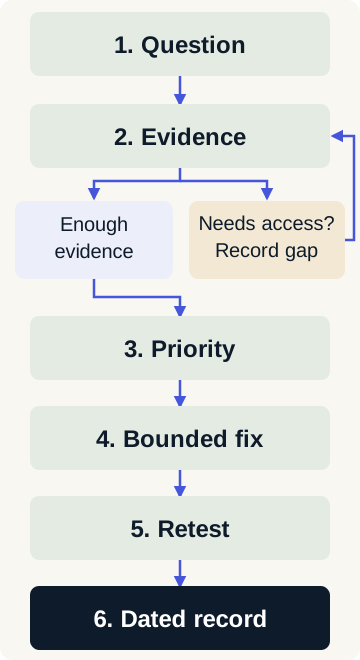
Start with a task that matters: identify the right service, understand its boundaries or send an inquiry. Write what you expected and what happened. “The site feels dated” is a useful concern to explore; “a phone visitor cannot find the service boundary before the contact form” is a testable finding.
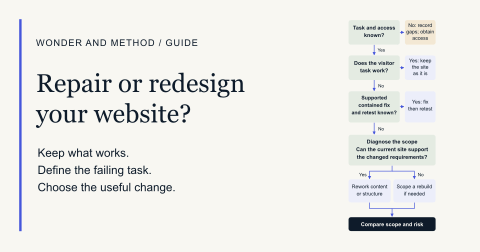
Still deciding whether the site needs a project at all? Use the repair-or-redesign decision guide before expanding the scope.
Use the CSV audit checklist to record the test, expected behavior, result, evidence URL/date, severity, owner, proposed correction, retest and access status. A blank result means untested. Keep screenshots and records free of passwords, customer messages and other private information.
Eight areas to inspect
| Area | Try this | What to record |
|---|---|---|
| Buyer journey | Follow one service question through to its next action. | The page where the task becomes unclear or stops. |
| Content and intent | Compare the headline, scope, proof and price explanation with the actual offer. | A missing fact, unsupported claim or conflicting page purpose. |
| Technical discoverability | Check the intended page URL, internal links, metadata and declared indexing policy. | Broken destinations or unintended crawl/index controls. Intentional noindex is a policy decision. |
| Phone and speed | Repeat the task on a phone; inspect loading and content movement. | Viewport/device, connection, date and the step affected. Label lab and field evidence separately. |
| Accessibility basics | Use the main path with a keyboard, visible focus, enlarged text and reduced motion. | Specific blocked controls or lost content; automated results are only part of the evidence. |
| Forms | Check labels, useful errors and whether a chosen service survives a retry. | Separate validation, saved receipt and notification delivery; verify each only when authorized. |
| Ownership and recovery | Identify the domain, hosting, editing and recovery owners. | Which accounts, exports and recovery steps were actually inspected. |
| Measurement | Identify the question, relevant page and available measurement window. | Source, dates, access gaps and limits on interpreting change. |
Our professional review records 22 dimensions across buyer relevance, design, evidence, offer clarity, journeys, accessibility, performance, search and ownership. These eight groups make a home checklist manageable; they do not replace the complete review or constitute accessibility, security or legal certification.
Turn a finding into a contained correction
Explain the practical consequence of each finding. A blocked primary inquiry task is usually more urgent than a minor spacing issue. An unsupported promise may matter even when every automated check passes. Record what is known, what is uncertain and who decides the priority.
Agree the affected area and completion test before editing. Preserve a recoverable version, implement the correction, then repeat the original failing task and check nearby behavior. An automated result is not a substitute for that retest.
Two documented fixes on our own website
The owned audit packet dated October 15, 2026 records two completed corrections, along with its machine-readable checks and source fingerprints. It is our studio site, not a paid client case.
- CA-01: make exclusions explicit. The Search page put excluded items beneath an inclusion heading without an explicit exclusion label. The fix placed “Not included” immediately before the exclusion list. The recorded local content check verifies that heading/list relationship.
- CA-04: preserve the chosen service. Care links used a generic unsure choice and the form lacked a Care option. Canonical Care, Improve, Grow and Audit choices were added, accepted by validation and retained in the native status/retry path. The record checks those visible choices and their retained values.
Those checks establish the two implementation changes. They do not establish production inbox delivery, paid client acceptance, a completed recurring service cycle or attributable search and inquiry gains. A rejected form response does not prove a saved inquiry. Separate synthetic browser records are identified as such; automated passes do not establish human accessibility certification.
Inspect the current Search page, the Care inquiry entry and the owned studio work. No inquiry submission is needed to read the records.
Use “needs access” when you cannot test
Public pages let you inspect copy, links and many layout or keyboard behaviors. Search Console, analytics, form storage, notification logs, account ownership and restore operations may require authorized access. Mark those checks “needs access” with a named owner and next step; do not turn a missing account into a pass or a guessed diagnosis.
A live form test can create a record or send a notification. Agree the test destination and synthetic data before submitting, then distinguish the browser confirmation, stored record and actual delivery. Recovery tests need a safe environment and an agreed rollback procedure.
Real users, assistive technology and physical devices can expose problems a scanner misses. If a task needs specialist investigation, record the boundary and commission the appropriate review instead of promising that a general website audit covers it.
Finish with a dated record and the next decision
- Link the original finding and its evidence date.
- State the approved fix and the exact changed page or component.
- Record the retest method, result, environment and unresolved limitation.
- Name the owner of the remaining issue and the next decision.
- Keep the accepted scope and paid handoff materials together.
Our $750 Audit & Fix Sprint covers an eligible supported site with up to 12 marketing pages, a full baseline and up to two agreed contained fixes. It does not promise to repair every finding. Search-only questions can start with the SEO scope; a larger redesign can start with a clear project brief. Share the task and evidence to discuss fit.