Planning / 6 min read
Repair or redesign your website? Choose the smallest useful change.
For Buffalo and Erie County small businesses deciding whether an existing website needs a contained fix, broader rework or a rebuild. Includes owned examples and a decision worksheet.
Begin with the failure, not the age of the site
An older website does not automatically need replacing, and a recent one can still make a customer’s next step difficult. Start with the task that is failing: understand the service, check its boundaries, find the right information or make an inquiry. Name the expected behavior and what actually happens before choosing a new design.
For a Buffalo or Erie County service business, that task may include checking an actual delivery area, a booking requirement or which jobs the business accepts. Those facts can reveal a small content gap or a larger change in the service. A new town name or a different visual style, by itself, does not establish the need for another page or a rebuild.
This is the decision before the project. If you need help documenting the failure, use the audit checklist; if a redesign is already justified, move to the redesign brief.
Keep what already does the job
Keep the current site when its important visitor tasks work, its content matches the business and the ownership and operating arrangements are sound. A clear, maintainable site does not need a new project simply because another design is fashionable.
Record what is worth retaining: accurate service copy, useful URLs, licensed images, recognizable identity, working forms and client-owned accounts. Also identify who can edit, export and recover the site. If those answers are missing, mark them as unresolved; do not assume that either a patch or a rebuild removes the risk.
No new project is a valid decision. Keep an identified next review trigger, such as a changed service, a recurring visitor problem or an editing need the current setup cannot support.
Choose a contained fix when the boundary is known
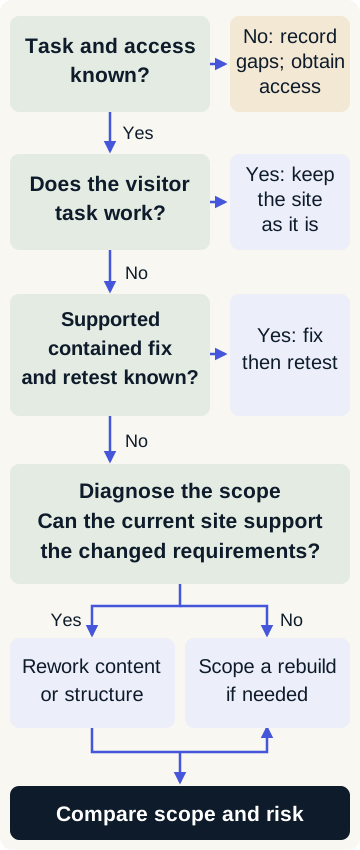
A correction is a useful candidate when the affected component is known, the platform and access are supported, a recoverable version exists and the completion test is specific. Correcting an approved label or retaining an inquiry choice may fit; an unknown failure across several external tools needs diagnosis first.
- Name the page or component that changes and what stays useful.
- Check the actual stack, delegated permissions and any provider dependency before agreeing the job.
- Describe how the original failing task will be retested, including nearby behavior.
- Keep any remaining issue and its owner visible instead of calling the whole site fixed.
A supported CMS in a website package does not imply arbitrary WordPress repairs, emergency recovery or security incident work. Existing-site work is accepted only after a fit and access review.
Two owned corrections that did not require a rebuild
Read the dated studio example and its limits
Our owned audit packet dated October 15, 2026 records two narrow changes to this studio website. The linked check record identifies the source and verification limits.
- Make an exclusion label explicit. The Search page listed excluded items without an explicit exclusion heading. The correction put “Not included” immediately before that list. A local rendered-content check verifies the heading/list relationship.
- Retain the chosen service. Care links used a generic unsure choice and the form lacked a Care option. Canonical Care, Improve, Grow and Audit choices became visible, accepted by validation and retained in the native status/retry path. The record checks those specific behaviors.
These were contained changes in known source, not evidence that every site can be repaired this way. They establish neither production inbox delivery nor client acceptance, measured search gains or savings against a rebuild. No paid client redesign or platform-rescue outcome is claimed.
See the owned studio work for the broader project context. The worksheet labels these observations separately from the hypothetical scenario below.
Distinguish broader rework from rebuilding
Rework can make sense when the existing system remains suitable but its content or page structure no longer explains the business. A rebuild becomes a candidate when agreed requirements cannot be met sensibly in that system. Establish which constraint is real before selecting a new platform; a visual preference and an operational limit are different reasons for change.
Changing the platform creates work of its own: content transfer, redirects where needed, form and tool checks, editing training and a recovery route. Include those responsibilities in the comparison; a new design does not automatically complete them.
Compare the approved scope and the risk left behind
Ask each proposed approach to answer the same question: what visitor task will work at acceptance, which assets and accounts remain useful, what must change and what is still unresolved? Compare the affected pages, provider costs, required inputs and retest. The smallest useful change is the one supported by that evidence, not necessarily the smallest quoted line item.
The $750 Audit & Fix Sprint is one finite option for an eligible supported site: a full baseline and up to two agreed contained fixes. It is not a general repair price or a promise to fix every finding. Current website build scopes are alternatives when the agreed job requires them, not automatic recommendations for an older site.
Use the budget guide for cost components rather than a guessed local repair rate. Actual dates depend on ready inputs, access, reviews, tool fit and capacity; the proposal records the agreed schedule.
Make the decision visible before commissioning work
Complete the repair-or-redesign decision worksheet. It asks for the failing task, evidence, retained assets and accounts, supported-stack/access check, affected area, correction hypothesis, acceptance/retest, decision and unresolved inputs. It includes the two owned corrections and one separately labeled hypothetical rebuild scenario; the final row is for your own situation.
Choose one next step: keep the site and record a review trigger; agree a contained correction; diagnose a wider unknown; or prepare a rework/rebuild brief. If the necessary access or facts are unavailable, leave the decision open and name the input needed. This is a decision record, not an automated recommendation.