Search / 6 min read
Why is my website not showing on Google?
Separate discovery, indexing, search relevance and Maps eligibility when a small business website is missing from Google. Includes a practical evidence worksheet.
Describe what is missing
“My website is not showing on Google” can describe several different problems. Perhaps a new page has never appeared, an older page disappeared after a redesign, a service search shows other businesses, or the business is absent from Maps. Each needs different evidence. Buying more pages before identifying the problem can leave the original issue untouched.
Write down the exact page address, search phrase, date and result you expected. Include whether you searched for the business name, a service or a location. A single search is a starting observation, not a complete performance report. If a customer sent a screenshot, ask which query produced it rather than guessing from the image.
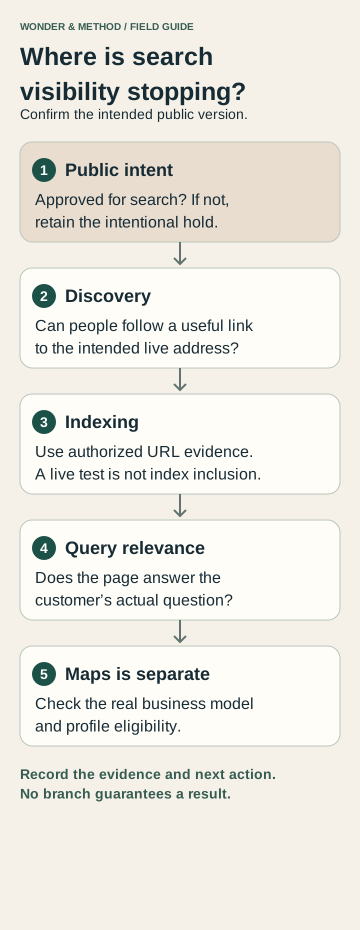
First confirm that the page should be public
Ask the site owner whether this version is ready for search. A preview, unfinished offer, private client page or deliberately held launch should not be made discoverable simply to clear an audit flag. Record who can approve a visibility change and which exact routes that approval covers.
For a page approved for search, ask the maintainer to check access and indexing instructions on the actual public address, including response headers. Google’s technical requirements distinguish a working, accessible page with indexable content from a guarantee of indexing. Blocking crawling and instructing a search engine not to index are different controls; changing either needs an intentional decision.
Check discovery and the current page
Can a visitor reach the page through a relevant link on the website? Does the link open the intended address and useful content, rather than an error, login or abandoned preview? Ask the maintainer to check the response and any redirects. For a replacement website, compare the old address with the agreed new destination.
- Record the canonical public address you intend people to use.
- Find a normal internal link to that page and follow it.
- Check whether a recent launch, address change or access change explains the timing.
- If a migration is involved, compare the old-to-new URL map before changing more addresses.
A sitemap can help communicate intended URLs, but it does not replace useful navigation or prove that a page is indexed. Use the migration checklist when useful old pages have moved.
Inspect indexing with authorized access
If the business has access to its Google Search Console property, inspect the exact URL. Save the reported status, date and relevant explanation. Distinguish information about Google’s previously indexed version from a live test of the current page. A successful live test is evidence about that test, not proof of inclusion or position in search results.
Google’s URL Inspection documentation explains these differences and the reported canonical. If another URL is selected, investigate whether it is a duplicate, intended replacement or unintended configuration. If access is missing, record the gap and ask the account owner for appropriate access; do not invent a diagnosis.
Illustrative example: an owner finds that an old service URL redirects to the homepage after a rebuild. The next task is to review whether a relevant replacement page exists and correct the agreed mapping where appropriate. Adding repeated town names to the homepage would not answer that specific problem.
Separate being indexed from answering a search
When the page is available for search but does not appear for the query you care about, review the question itself. Does the page clearly explain the relevant service, who it serves, delivery boundaries and the next step? Does it provide useful facts a prospective customer needs, or mostly general promises?
Review available Search Console queries and pages over a stated period. Distinguish impressions, clicks and actual inquiries. Agree one improvement and record when it was made; avoid treating a simultaneous redesign, price change and content rewrite as proof that one sentence caused a result. The SEO reporting guide explains what a useful work record contains.
Treat Maps as a separate question
A missing business profile is not the same as a missing website page. Check the business’s actual operating model and Google Business Profile eligibility before proposing profile work. Do not invent a storefront or office to make the business look local. Online service reach can be explained honestly on the website.
Finish with a written next step: retain an intentional hold, resolve a confirmed access problem, inspect an indexing explanation, improve a relevant page or investigate eligible profile details. SEO research and implementation can address an agreed website task; a broader website audit can help when search, content and inquiry problems overlap. Neither establishes a guaranteed ranking or timetable.
Use the reported reason to choose the next check
| Finding | What to check next |
|---|---|
| Excluded by noindex | Confirm this public page is approved for search. Then inspect both the HTML robots directive and X-Robots-Tag response header. |
| Blocked by robots.txt | Review the rule affecting this exact path. Crawling restrictions and noindex do different jobs; do not remove a deliberate private/preview policy. |
| Page with redirect or another canonical | Follow the destination and compare it with the intended URL map. Inspect the selected canonical separately. |
| Not found or server error | Open the URL, check the HTTP response and review hosting/application errors. Fix a wrong internal link or an unintended failure. |
| Discovered — currently not indexed | Google knows the address but has not crawled it. Check internal links and server availability; this status alone does not identify a content defect. |
| Crawled — currently not indexed | Google fetched the page but has not indexed it. Review whether it adds distinct value and duplicates another page. Repeated submission is not a remedy. |
These checks follow Google’s Page indexing report documentation. Use URL Inspection for the exact page, compare the recorded crawl with a live test and keep the evidence date. A live pass cannot guarantee indexing.
If the page is indexed but a service search does not show it, examine the query and page in Search Console’s Performance report. That is a relevance and visibility question, not proof of a broken sitemap. Google Analytics 4 can help assess visits when correctly configured; it cannot establish Google’s indexing decision.