Planning / 6 min read
A website maintenance checklist for a small business
A practical website maintenance schedule for forms, content, accounts, recovery and supported updates, with a downloadable work log and clear ownership.
Begin with the tasks your website must keep doing
Website maintenance is a recurring responsibility, not a promise that nothing will ever go wrong. Start with the tasks that matter to the business: explain the current service, let a visitor contact or book, deliver that request to the right place and give the owner a recoverable way to operate the site. A site that loads can still fail one of those tasks.
Write down the platform, domain, hosting, forms, booking provider and any connected tools. Name who owns each account and who can approve changes. Keep credentials in an appropriate password manager or access system; the downloadable log is for tasks and evidence, not passwords or private customer data.
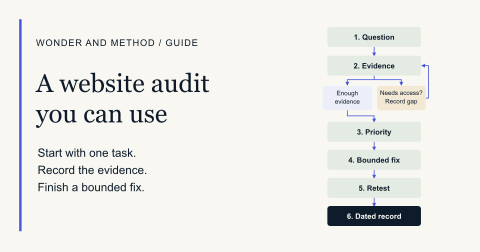
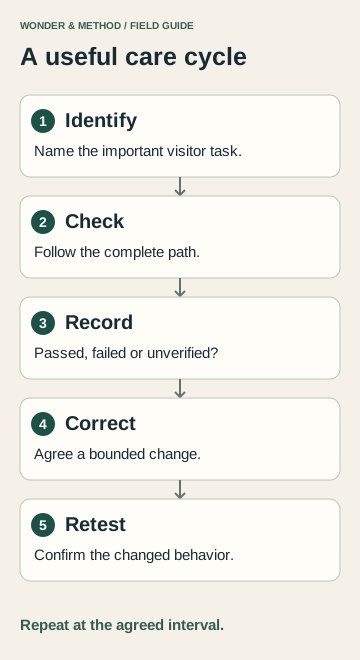
Use the website maintenance log to record a check, its owner, observed result, next action and retest. The cadence below is a planning example, not a universal service commitment.
Use a schedule that matches the actual website
| When | What to check | What to record |
|---|---|---|
| After an approved change | The changed page or tool, nearby navigation and its main visitor task. | The exact change, affected URLs, observed result and recovery option. |
| Monthly or at an agreed interval | Important pages on a phone, contact and booking paths, current service details and available alerts. | Which tasks were checked, which were not and the person responsible for any follow-up. |
| Quarterly or after a material business change | Account ownership, access, recovery arrangements, outdated content and outstanding issues. | Access gaps, upcoming renewals, recovery evidence and the next agreed priority. |
| Before a renewal or seasonal change | Domain and provider renewal details, dates, availability and any expiring offering. | Who confirms the renewal or content change and its due date. |
A store, booking business or frequently updated CMS may need a different cadence and specialist support. Agree the interval and response coverage explicitly. Automated availability checks can help surface a problem, but they do not prove that a customer can complete the whole journey.
Check the complete inquiry path
Open the site as a visitor and follow an important service page to its form, email link or booking tool. Check labels and required fields, error handling and the confirmation shown after submission. Use a clearly identified test with appropriate permission and no real customer information.
Then verify the receiving side. A success message alone does not establish that the business received or can recover the request. Where a system retains submissions, check the saved record and the owner’s access. Otherwise, document the actual receipt arrangement. If a provider sends notifications separately, confirm that notification as a distinct step.
Record any unverified part instead of marking the entire process passed. The contact-form troubleshooting guide explains how to separate the visible form, saved record and notification.
Review the facts a customer relies on
- Are services, service areas, hours and contact routes still accurate?
- Do prices, inclusions and booking requirements agree across the site?
- Do links and downloads reach the intended current destination?
- Can a phone visitor read the content and reach the next step without a layout problem?
- Do expired events, offers or staff details need a clear update?
- Can the responsible editor make an approved change without breaking the page?
Make a small, coherent list of corrections. A maintenance batch should identify the supplied changes, affected content and verification. New services, a major rewrite or a new application may require a separately scoped project rather than being treated as routine upkeep.
Keep updates and recovery tied to the supported platform
The maintenance procedure depends on the actual site. A static site, managed CMS and custom application have different update and recovery responsibilities. Confirm what the provider maintains, what the business owns and which changes require a qualified operator. Do not apply a plugin or platform update checklist to a site that does not use those components.
Before a consequential change, identify a recoverable version and a supported way to restore it. A backup file existing somewhere is not the same as a verified recovery procedure. Agree a suitable test environment or safe recovery check, then record what was demonstrated and what remains untested.
Routine maintenance is not a universal emergency-recovery or security-incident service. If access, the stack or the failure is outside the agreed support, record the gap and obtain the appropriate help before making dependent changes.
Finish each cycle with a useful record
A clear work record separates checks, changes and outcomes. It should identify the date, affected page or tool, observation, correction if one was approved, retest result and next owner. Leave failed, blocked and untested items visible. A list of completed tasks does not establish increased rankings or inquiries.
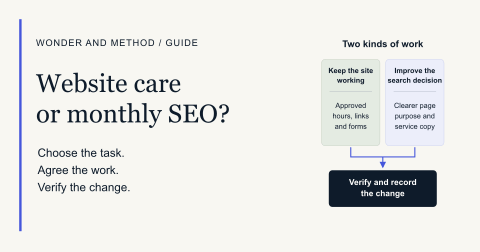
At Wonder and Method, Keep Running is $150 per month and includes its defined monitoring, focused monthly check, related small-change batch and dated receipt. Improve and Grow add agreed improvement priorities. Actual fit, coverage, provider responsibilities and external fees are confirmed before enrollment. Read the current care scope and compare care with search work.
For a one-time problem, the Audit & Fix Sprint may be a more suitable bounded next step. Download the maintenance log and describe what is working, failing or still unverified before requesting help.