Websites / 6 min read
What a contractor website needs before more traffic
Plan contractor website content around accepted jobs, project evidence, service areas and estimate requests. Includes a content and inquiry worksheet for a real project brief.
Make the accepted job clear
A contractor website should help a visitor decide whether the business does the work they need, serves their location and has a sensible way to assess the request. More traffic does not resolve an unclear offer or an inquiry form the team cannot use. Start with those decisions before adding pages or choosing an SEO campaign.
Write down the actual trades or services, the types of jobs accepted, meaningful limitations and the next step. A business taking planned remodeling projects should not accidentally imply emergency repairs. A firm accepting commercial work should explain that distinction rather than relying on a photograph to communicate it.
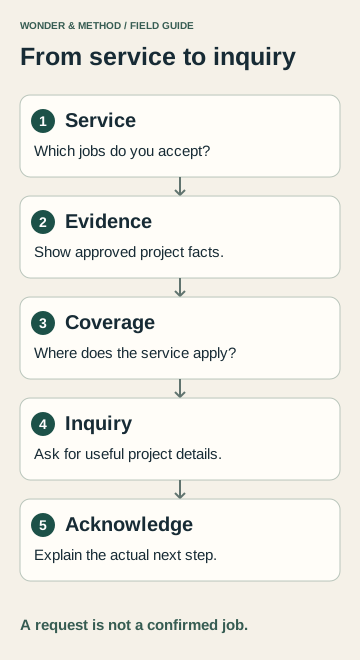
The contractor website worksheet connects each service with evidence, coverage, inquiry fields and a completion check. Use it to prepare a real brief; the example row is fictional.
Give each service a useful answer
A service page earns its place when a customer needs a distinct explanation. Describe the work included, suitable projects, dependencies and what happens before a quote or appointment. Closely related words can often share one page when they describe the same service and decision.
- Name the work in language customers use and the team can support.
- Explain what information is needed to assess a request.
- Identify any site visit, consultation or review required before pricing.
- Use approved process details instead of promises about speed or availability.
- Link related services and the actual inquiry route.
A county or town name is useful when it clarifies coverage. Repeating the same service copy across many town pages adds little for the visitor. Create a distinct location page only when there is substantial, accurate information that belongs there.
Show work you can substantiate
Project photographs and short explanations can help a customer understand the work. Obtain the necessary permission and rights, identify what the business actually did and remove private customer details. A concise example can name the problem, scope, constraints and completed work without inventing a performance result.
Keep professional credentials, insurance statements, memberships and reviews accurate and current. Publish them only when the business has supplied and approved the supporting facts. Do not create testimonials or imply that an illustrative design is a completed customer project.
For a new business without suitable project examples, use a clear service explanation and an honest process. A labeled illustration can explain how work is planned, but it should remain visibly distinct from evidence of completed jobs.
Explain where and how you work
State the real service territory and how location affects the next step. If work depends on job type, travel distance or scheduling, explain what the team needs to confirm. The website should distinguish an office address, a travel area and online communication rather than treating them as interchangeable.
For a New York business covering several towns or counties, a navigable coverage section can answer the first location question. Municipal names sometimes overlap; use enough context to avoid confusion. Niagara Falls, New York and Niagara Falls, Ontario, for example, are different locations.
Our county service guides show one way to organize regional information. Your business needs its own accurate coverage and evidence. See the service-area page guide for the decision about when another page is useful.
Ask for the information needed to respond
Choose form fields with the person who handles requests. Useful starting points may include the service, job location, short scope description, preferred contact method and desired timing. Ask only for information the team needs at this stage, and explain any next review or response expectation accurately.
An estimate request is not a confirmed price, accepted job or appointment. The confirmation should say what happened and what the customer should expect next. If the system retains submissions, the owner needs access to the saved record; notification delivery is checked separately.
Photo uploads, custom quoting, dispatch and customer portals can add complexity and privacy responsibilities. Include them only after defining the actual workflow, supported provider, access, storage and costs. They are not automatically part of a simple marketing website.
Walk through the complete request on a phone and confirm the receiving side. If it fails, use the form troubleshooting guide before spending more to attract visitors.
Use SEO to improve an already useful path
Keyword research can reveal how people describe a service or a question before buying. Check the location, intent and current search results before deciding what to create. A reported low or zero search volume is a limited estimate, while an unavailable metric means the tool returned no measurement; neither replaces knowledge of real customer questions.
Map relevant terms to useful service pages, coverage information or a substantive guide. Then review headings, internal links, indexability and the visitor’s next step. Track what was changed and use available search and inquiry evidence over a suitable period, without attributing every fluctuation to one edit.
At Wonder and Method, custom website design starts with an agreed scope; SEO work adds defined research and implemented improvements. Use the worksheet to outline the services, approved proof and inquiry process, then discuss the project.